
Sub-Total: $0.00
Full Manual for Speaker Pillow
1. Introduction
The Speaker Pillow is designed to be used on top of your head, over your open ear, and not resting under your head.
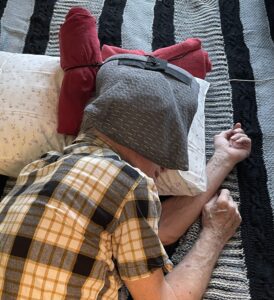
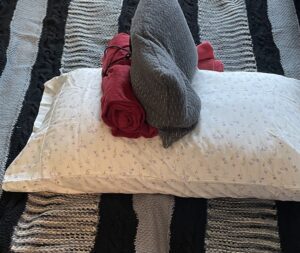
Use the Speaker Pillow with a rolled-up towel tied to the top of the Speaker Pillow and placed between the headboard and the free end of the long side of the Speaker Pillow (see Figure 2). This first rolled-up towel prevents the Speaker Pillow from moving, keeps the speaker cord out of the way, and eliminates the need to rotate the Speaker Pillow 90 degrees. Additionally, the rolled-up towel prevents the Speaker Pillow from rotating or falling off your head (see section 11 for further details).
A second rolled-up towel is optional and may be tied to the side of the Speaker Pillow (see Figure 3). This second towel swings left or right, depending on which way you want to face and whether you want to block light in your line of sight. When viewing a screen, keep the side towel at the back of your head; when going to sleep, keep the side towel in front of your eyes. Both towels are used at the same time but for different purposes.
A small open hand towel should be placed over the Speaker Pillow, your head and eyes, and optionally the rolled-up side towel to create a "tent" for shading.
When sleeping on your back, the side towel is useful for keeping the Speaker Pillow positioned next to your ear, preventing it from drifting off.
2. In the Package – No Assembly Required
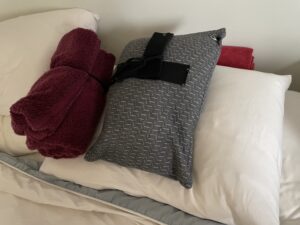
Your Speaker Pillow comes completely assembled and ready to use (see Figure 1).
Your Speaker Pillow Consists of Three Main Parts:
- A pillowcase for the Speaker Pillow, with a zipper closure at the open end. The pillowcase can be removed and washed.
- A travel or camping-size pillow with a permanent built-in cavity to securely hold a small speaker.
- A small speaker, which fits in the pillow cavity and can be removed. An external audio cord connects the speaker to an iPad, iPhone, or similar device via a standard 3.5mm stereo male plug. The audio cable includes a volume control near the speaker side of the cable.
3. Overview of Three Main Uses
The Speaker Pillow is designed to be used while lying on either side, with the Speaker Pillow on the upper ear. It can also be used while lying on your back, with the Speaker Pillow on one side.
Three Main Uses:
- To help you fall asleep at night, return to sleep after a nighttime wake-up, or take a short nap during the day by preventing stressful thoughts from keeping you awake. This is achieved by listening to spoken text from an audiobook or similar source, as the mind cannot concentrate on two things at once for an extended period.
- To listen quietly in bed (without disturbing others) while lying on your side and optionally viewing a screen. To do this, position the Speaker Pillow so the long open part (the section without the speaker) is toward the top of the bed, freeing up your vision. This setup is ideal for audiobooks, news, movies, concerts, plays, videos, podcasts, lectures, meditations, and TV. You can also use this setup while lying on your back with the Speaker Pillow on one side of your head.
- To block unwanted noise such as snoring, street sounds, or dormitory noise from keeping you awake.
4. Preventing Speaker Cord Tangles
The audio cable should stay at the head of the bottom pillow as it runs toward the iPad or iPhone at the side of the bed. The speaker cord should never be in contact with your head or neck. The rolled-up towel at the head of the bed helps keep both the Speaker Pillow and cord in place. Using a tied-on rolled-up towel at the head of the bed is essential to prevent cord entanglement.
5. Setting the Speech Volume
- Plug in your speaker cord and set the volume on your iPhone or iPad to the maximum level.
- Leave the Speaker Pillow amplifier off.
- Adjust the volume control on the Speaker Pillow cord to just above the audible level.
- Rotate the volume control wheel toward the speaker to increase the sound.
The goal is to set the volume as low as possible while still allowing you to hear clearly.
6. Preventing Speaker Noise Leakage
Speaker noise is typically inaudible to others in bed or nearby, as the speaker volume is set low, and the built-in cavity acts as a sound booth, reducing noise escape and blocking external sounds like street noise or snoring.
You have two listening options:
- Clear, quiet sound: Ideal for focused listening to an audiobook or podcast.
- Low, indistinct sound: This allows you to focus on the "music of prose" rather than the storyline, making it easier to drift off to sleep.
A recommended timer setting for either option is 30 minutes to start. However, 2–3 hours is also a common choice. Experiment to find what works best for you.
7. Using an Audiobook or “Assisted Reader” from Amazon Kindle
Audiobooks can be helpful for falling asleep. Many e-books from Kindle offer an option to add audio content, and you can also subscribe to services like Audible for access to more books.
Steps to Use an Audiobook:
- Download the Kindle app for iOS from the Apple Store (it's free).
- Choose an audiobook—starting with a classic like Winnie the Pooh is recommended.
- Purchase the Kindle version with Audible narration from Amazon.
Of course, you can also use a recorded meditation or other audio content.
Alternatively, you can use the "Assisted Reader" function of Kindle. This will read many works on your iPad or iPhone with a computer voice of your choice. To turn on the Assisted Reader” function, click on the AA icon and then pick the heading “more”, and turn on “Assisted Reader”. You will see a speaker button in the lower right corner of the screen. When you press this, the current page will fill the screen and start to read. You toggle sound from “pause” to “resume” by pressing the space bar. To stop “Assisted Reader”, go to the Kindle library. You can adjust voice speed as desired. Currently voice will stop after half an hour and you can restart if you want.
8. Using Apple’s VoiceOver
Apple’s VoiceOver tool offers advanced text-to-speech features, allowing you to customize the voice, speaking speed, and volume.
Setup Recommendations:
- Set the speaking speed to slow to help induce sleep.
- Experiment with different voices and speeds to find what works best for you.
If using Kindle books, note that VoiceOver only works with Kindle on an iPad or iPhone. Install the free Kindle app on these devices for the best experience.
9. Setting the Apple Timer
- Open the Clock app on your iPhone or iPad.
- Select Timer and scroll down past all the alert sounds.
- Choose "Stop Playing" at the bottom of the list and set it as the default action.
- Set the timer to your preferred duration.
Tip: Set the timer before starting the audio. Many users prefer an initial setting of 30 minutes.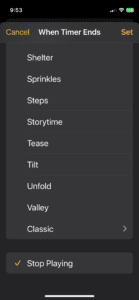
10. Turning Auto-Lock to "Never"
Auto-Lock is an Apple feature that turns off the screen after a set period of inactivity. The maximum standard setting is 15 minutes, but for uninterrupted audio playback, set it to Never.
Steps to Disable Auto-Lock:
- Open Settings on your device.
- Go to Display & Brightness > Auto-Lock.
- Select Never.
Reminder: Manually turn off your iPad in the morning to conserve battery. Keeping the charger plugged in overnight can help prevent accidental shutdowns.
11. Adding Rolled Towels to Your Speaker Pillow
To prevent trouble keeping your Speaker Pillow on your head, place a rolled-up towel at the headboard edge of your Speaker Pillow. You may need to place a second rolled-up towel above the first and also under the cord. The non-speaker end of the Speaker Pillow needs to rest on a flat surface to prevent tipping or rolling off your head.
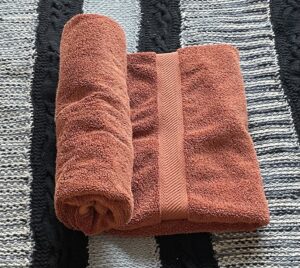
The procedure for forming a rolled-up towel is very simple:
- Begin by unfolding a beach towel or bath towel and fold each long side to the middle line. (see figure 11.1 below)
- Roll the towel up from one end halfway. (see figure 11.2 below)
- Turn down the last 8 inches or so of the open end of the towel and then finish rolling up the towel, so you will have a clean edge. (see figure 11.3 below)
- Using one of the black nylon cords supplied, place the black cord under the middle of the rolled-up towel. (see figure 11.4 below)
- Now put the free end of the cord through the loop at the other end, pull the cord tight over the middle of the towel roll, and then make a half hitch to secure this tightened cord. (see figure 11.5 below)
- Tie the other end of the cord to one of the clips and D-rings on the Velcro. You can adjust this length as desired. See Figure 11.6 below.
Optionally, repeat these steps for a second or third rolled-up towel. If you do not use a rolled-up side towel, at least use a hand towel on top of your Speaker Pillow and over your head and eyes when going to sleep.






12. Best Place to Put Your iPad or iPhone for Falling Asleep
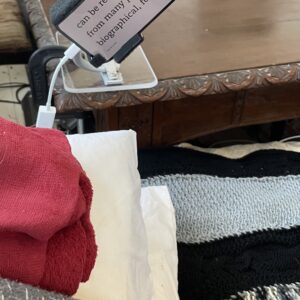
I suggest putting your iphone or iPad on a small table at the side of your bed. The reason for this is that touching the iPhone or iPad screen will disrupt the playback of text, which can easily happen if the device is on your bed, and you move around in your sleep. If necessary, you can clamp a slight extension onto the edge of the table using a short piece of wood or cardboard.
Note: Some people enjoy setting up their iphone or iPad while lying in bed. You can also do this while kneeling on the bed or standing before getting into bed.

13. Suggested Body Posture for Falling Asleep
The goal is to instantly feel yourself floating and weightless. Lie on either side, placing a pillow between your knees and another pillow close to your chest. This second pillow is for your upper arm to rest on. Rest your head on one or two additional pillows as necessary to support your head without putting too much pressure on your lower shoulder—the shoulder resting on the mattress. Ideally, you should also have a pillow against your back. Finally, position the Speaker Pillow on the top side of your head.
Note: If you are lying on your back, you can use a regular pillow lengthwise under your knees and legs. This will keep pressure off your ankles and increase your sense of floating. You can also place a small pillow on the open side of your head, with a small hand towel over the top of this pillow and the Speaker Pillow, forming a small tent.

14. The Rotating iPad or iPhone Holder
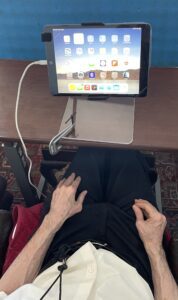
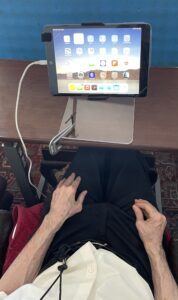
Holding an iPad or iPhone at an angle of 70°, where the far side (towards the feet) is raised up (adjustably), makes it possible to read perfectly while lying on your side in bed. Alternatively, you can view movies and newscasts comfortably in this position. This is a great way to read a book in bed, with or without sound.
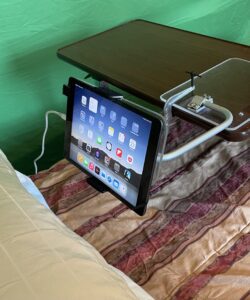
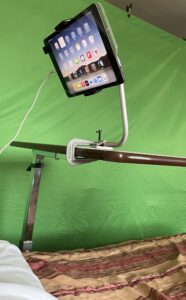
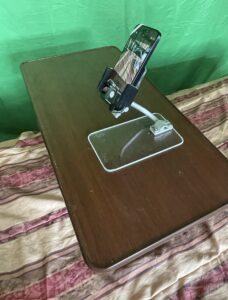
This rotating and projecting stand is also an ideal way to hold an iPad and keyboard at the bedside when using the Speaker Pillow to fall asleep. Additionally, this stand can be used for normal reading on a desk or table. The rotating and projecting iPad stand can ship in the same box as the Speaker Pillow.
One of the main uses for the Rotating and Projecting iPhone Holder and Rotating and Projecting iPad Holder is to clamp onto a portable bed table in any Hospital, Nursing Home, Rehab Center, or private Home in such a way as to be always out of the way of nurses and meals. These two Holders offer adjustable height as well as rotation and tilt. A table clamp comes with each unit. See Figure 14-3 and Figure 14-4 below. Note that the arm of each unit can swing above its base or project out in front of the base.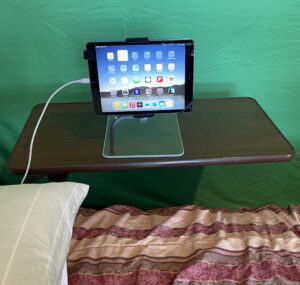
15. “Sleep Buddy” Manual Self-Massage Tool
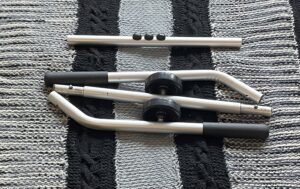
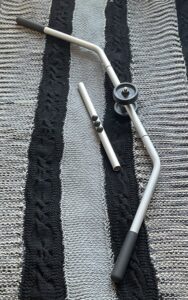
Many people find they cannot get back to sleep during the night because resting on one side of the body causes circulation issues. The “Sleep Buddy” is a manual, quiet self-massage tool for the neck, shoulders, back, hips, buttocks, and thighs. It is ideal for restoring circulation after a bathroom break in the middle of the night. A one-minute massage before returning to bed can significantly improve your chances of falling back asleep.
The tool consists of two opposing wheels, one on either side of a C-shaped anodized aluminum tube, which snaps apart for easy storage. The motion produced is unique, creating a parallel, pressured wave of motion where you control the pressure and length of movement. The parallel wheels are spread apart, so both sides of the spine can be massaged simultaneously.
This unit is medical-grade and designed for easy travel.
If you have been sitting in front of a desk or computer for hours before bed, your buttocks may become sore, making it difficult to fall asleep. A one-minute quiet self-massage with the “Sleep Buddy” before bed will quickly relieve this discomfort.
Note: You can also do some deep knee bends to help circulation.
Learn how to give yourself a one-minute circulation massage for free at:
www.helpmyreading.com/Site/Massage_Tool.html


16. Additional Tips for Falling Asleep Quickly
- Take a hot shower just before bed.
- Exercise for at least 30 minutes a day, but do so in the morning, noon, or afternoon to avoid interfering with your circadian rhythm.
- Once in bed, give yourself a 30-second face massage. This relaxes many muscles you may not realize are tight and prevents unnecessary itchiness.
- Do not go to bed hungry. Hunger prevents sleep. If necessary, have a small, healthy snack and drink a little water.
- Avoid coffee or alcohol late at night.
- Stand up and walk around for at least 20 minutes before bed. This helps prevent soreness from prolonged sitting. (This is in addition to the buttocks massage and deep knee bends mentioned earlier.)
- After getting into your final sleeping position, take a deep breath and hold it, then slowly release. Repeat this three times in a row to calm your body.
17. For a Deeper Understanding
Please read the section below titled Research Findings. This article covers the history and discoveries behind this project. At the very least, try to read the last four paragraphs of the article. Also, here is a summary of problems with other attempted solutions.
- The ear phones cause pressure/pain on the ear.
- The ear phone and headband cannot be adjusted for a precise fit.
- The head band does not block out all light from around the nose and eyes.
- Any movement of the headband requires frequest adjustments.
- The headband and strap causes pressure on the forehead and side of the head.
- There is no quick way to see the screen if desired, without disrupting the whole arrangement.
- The bluetooth earphones have to be recharged everyday vs almost never with our product.